Description
The Falcon cluster at the Computer Science Department is an HPC cluster which supports both CPU and GPU jobs.
The hardware specifications are listed as follows:
- 4x AMD EPYC 74F3 CPUs and 3x AMD Ryzen Threadripper 3960X ( 240 total cores )
- 2.5 Tb RAM
- 8x Nvidia A100 & 12x Nvidia GeForce RTX 3090 GPUs ( 928Gb total GPU memory )
System overview
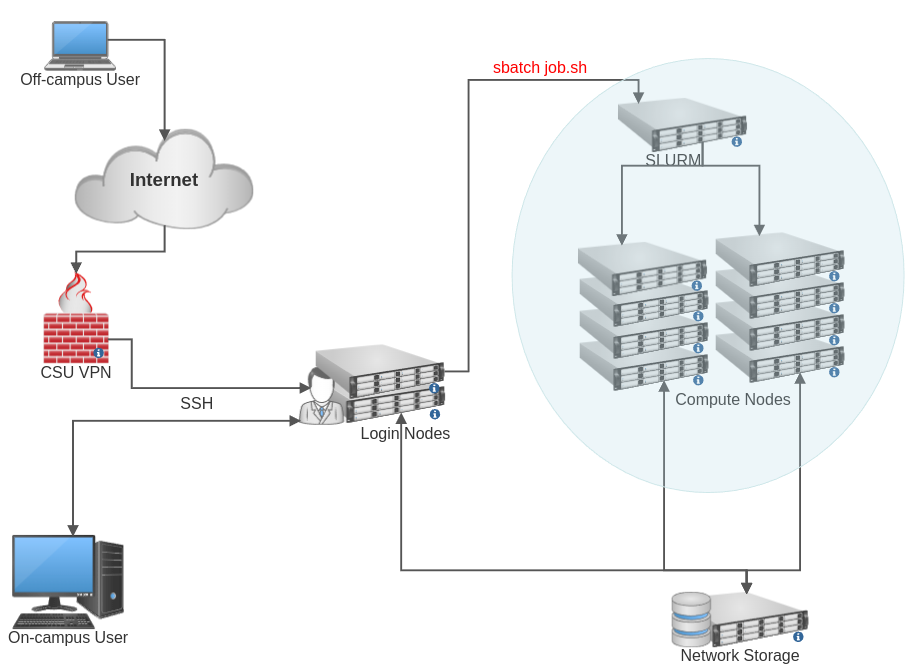
Cluster Nodes
Here is a brief description of the types of nodes:
Login nodes
Users work on these nodes directly. This is where users log in, access files and submit jobs to the scheduler to be run on the compute nodes. Furthermore, these are the only nodes that can be accessed via SSH/SCP from outside of the cluster.
Compute nodes
These nodes are where the actual computing gets done. Users do not log into these nodes directly. Instead jobs are created and submitted from the login nodes and a scheduler decides which compute resources are available and when to run the job.
Management node
There is one management node, which is reserved for administration of the cluster. It is not available to users.
Queueing System
On Falcon, we use the open-source scheduler Slurm, to manage all compute jobs. The process is described in detail in the Job handling section.
Storage
The following storage locations are available on the Falcon cluster.
CS NFS Space
The cluster has read/write access to the same NFS shares as any other CS Linux system
Scratch Space
All compute nodes have a local scratch directory on a high speed SSD, and it is generally about a tera-byte in size. This is used by the scheduler to store temporary job files. Users can access this scratch space as /tmp directory in their job scripts. The access is allowed only for the duration of their job. After jobs are completed, this space is purged automatically. This space is shared between all users, but your data is accessible only to you.
More On The Falcon HPC Cluster
To learn more on the Falcon HPC Cluster, please click on the link below:
